COUNTDOWN VIDEO STUDIO
Authentic rankings.
Buttery-smooth videos.
Turn real data into countdown videos your audience can’t stop watching — created in 2 minutes, rendered at your machine’s full speed. No queues. No export minutes.
Card required · 5 trial exports · cancel anytime before day 7
The 20–30 second output video plays here
uploads as videos/hero-output.mp4
THE ENGINE
A full video studio, in your browser.
Seven workspaces: data sheet, card design, two image editors, GIF, a multi-track sound timeline — and a preview that runs like glass. Excel opens directly. Music auto-ducks under your voice-over.
- ▸Renders on your GPU — no queue, no upload
- ▸Frame-perfect exports up to 4K
- ▸Save and reopen full projects
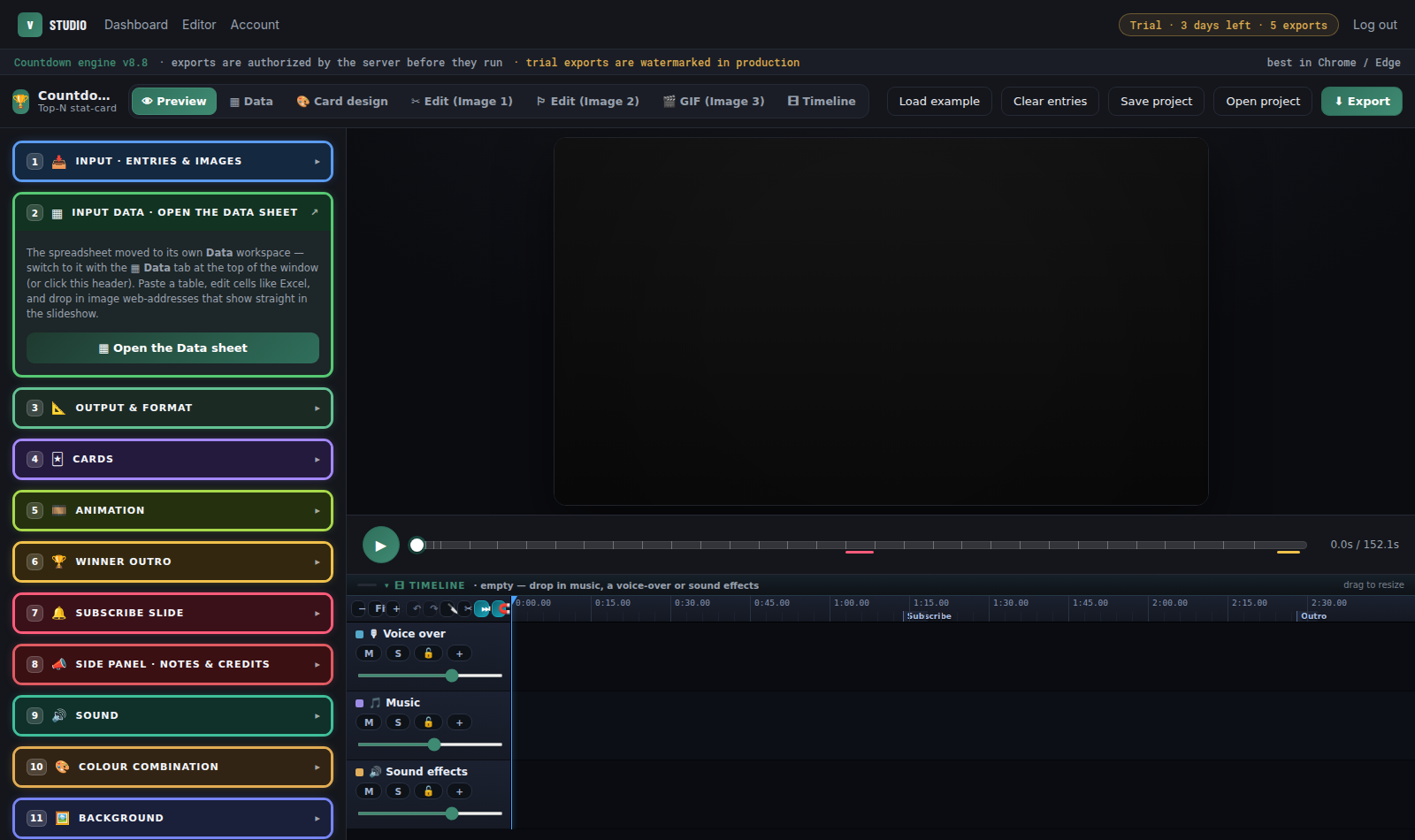
13 LOOKS MADE IN THE EDITOR — LIVE
Keep scrolling. The reel plays.
A1 · Slideshow Type 1
The look the editor opens on: four full-height cards dealt out one from behind the other, the full picture, caption bars, a red hexagon badge that flies in and a gloss sweep
A2 · Comic Burst
Cyan halftone, the figure on a red starburst, a black name band and a line of description
A3 · Hexagon Classic
Sunburst yellow rays, the Slideshow Type 1 hexagon badge, the name and a line of description
A4 · Make Ranks Design 1
The Slideshow Type 1 hexagon badge in lime, with a soft moving glow, its rim, gloss and fly-in; a pale name band, and the description over the picture
C2 · Clean Center
Rounded white cards with a rank tab at the top
C3 · Editorial White
Coloured rank tab, capital name, flag under a rule
C8 · Neo-Brutal Pop
Pastel cards, thick black outlines, hard shadows and a rank sticker
C9 · Varsity Patch
College colours, a stitched edge, a gold rank patch over the corner and a description box
D2 · News Desk
Red top strap with the figure counting up in it, bold caps and a white info deck
D4 · Stat Sheet
A data card with a bar measured against the #1
D5 · Bluey Tech
Yellow rank tile, a tall picture, a blue name band, a description box, and the figure and the country's flag on cream
D6 · Black & Yellow
Dark cards, a yellow name bar with a rank block, and a description box
F1 · Trading Card
A collectible frame in each card's colour, a name plate, a rank coin and the country's flag
THE DATA LIBRARY
Real numbers, images attached.
The research is already done. Rankings ship with authentic figures and imagery, refreshed on paid plans — or paste your own spreadsheet; Excel opens directly.
Richest People in the World · 15 rows · opens straight in the editor, the trial included
+ 7 more rows in the Studio · illustrative sample figures · browse the library →
QUESTIONS CREATORS ASK
Have questions like these?
How do I make a top 10 countdown video for YouTube?
Pick a ranking, choose a design and export; the whole countdown is animated for you.
From data to video in about 2 minutes.
How do I start a faceless YouTube channel?
Countdown videos need no camera and no face: real data, pictures, music and your voice-over if you want one.
Your first faceless video starts here.
What are good faceless YouTube channel ideas?
Rankings work in almost any niche: money, sports, movies, space, history, tech.
Ready-made topics are waiting in the Data Library. →How do I make a YouTube video go viral?
Pick a topic people argue about, back it with real numbers, and keep viewers guessing until #1.
That's exactly what a countdown does.
Where can I find data for top 10 videos?
In the Data Library: rankings with real numbers and pictures, ready to load.
The research is already done. →What's the easiest top 10 video maker?
One that does the animation, the data and the pictures for you, in your browser, with no editing skills.
You're looking at it.
Are there templates for countdown videos?
25 designs on 25 backgrounds, every card editable by hand; Pro saves your own designs.
One click opens any of them in the editor. →How do I turn Excel or Google Sheets data into a video?
Paste the table into the Data sheet, or drop in an Excel or CSV file: every row becomes a card.
Copy, paste, done.
How do I make smooth ranking videos without editing skills?
The motion is automatic, with motion blur and no jumpy frames; voice-over and music go on a built-in timeline that lowers the music under speech.
Smooth by default.
Can I make YouTube Shorts and 4K videos?
Yes: every plan exports vertical 9:16 for Shorts, Reels and TikTok and 16:9 for YouTube; Starter and Basic up to 1080p 60 fps, Pro up to 4K 120 fps.
One project, every screen. →You’re on the right platform.
Start 7-day trialPRICING
One trial. Three plans.
Limited to 1,000 seats· then a waitlist
Every plan starts with a 7-day trial: 5 watermarked exports in 1080p, any 15 of up to 50 trial topics and every editor tool unlocked.
Card required · cancel anytime before day 7
Starter
$9.9/mo
or $99/year · 2 months free
- ▸10 exports/mo · 1080p·60fps
- ▸MP4
- ▸Library of 1,000+ topics · open 30 a month (topics marked Pro excluded)
- ▸10 saved projects
- ▸Email support
Basic
$39/mo
or $390/year · 2 months free
- ▸60 exports/mo · 1080p·60fps
- ▸MP4, WebM
- ▸Library of 1,000+ topics · open 150 a month (topics marked Pro excluded)
- ▸YouTube thumbnail with every video: pick the cards, a heading box, fonts and your own PNGs
- ▸20 saved projects
- ▸Email support
Pro
$99/mo
or $990/year · 2 months free
- ▸250 exports/mo · 4K·120fps
- ▸MP4, WebM, PNG sequence + After Effects / Resolve scripts
- ▸Library of 1,000+ topics, every one included, plus 100+ new topics every month (Pro only) · open up to 1,000 a month
- ▸YouTube thumbnail with every video: pick the cards, a heading box, fonts and your own PNGs
- ▸Render up to 20 videos in 1 click: pick your saved projects and they render one after another, unattended
- ▸Upload a workbook, or up to 10 at once: every sheet becomes its own video, with a folder of pictures for each
- ▸Design your own templates & save them (Card design → My card designs)
- ▸100 saved projects
- ▸GIF workspace
- ▸Priority support
All rendering happens on your machine — no queues, no export minutes, ever. Details in Good to know.